
Medical Alert Systems for Seniors Who Live Alone: The Complete Guide for 2026
Dorothy called me at 11pm last Tuesday. Not because she fell. Not because she was hurt. She called because her smoke alarm went off, she panicked, and she had nobody in the house to turn to. She is 74, sharp as a tack, and completely alone every single night. That phone call sat with me for days.
Living alone after 65 is more common than most people realize — the US Census Bureau reports that over 14 million Americans aged 65 and older live by themselves. And for every one of them, the gap between a minor incident and a major crisis is often just one unanswered question: is there anyone who will know if something goes wrong tonight? The right medical alert system for seniors living alone answers that question. But choosing the wrong one — or none at all — leaves that gap wide open.
🎯 The Bottom Line
The best medical alert systems for seniors living alone in 2026 are:
- Lively Mobile2 — Best overall for solo seniors, GPS anywhere
- Medical Guardian Ultimate GPS — Best fall detection + monitoring
- Bay Alarm Medical SOS — Best budget emergency button for elderly living alone
- ADT Medical Alert Plus — Best for tech-resistant solo seniors
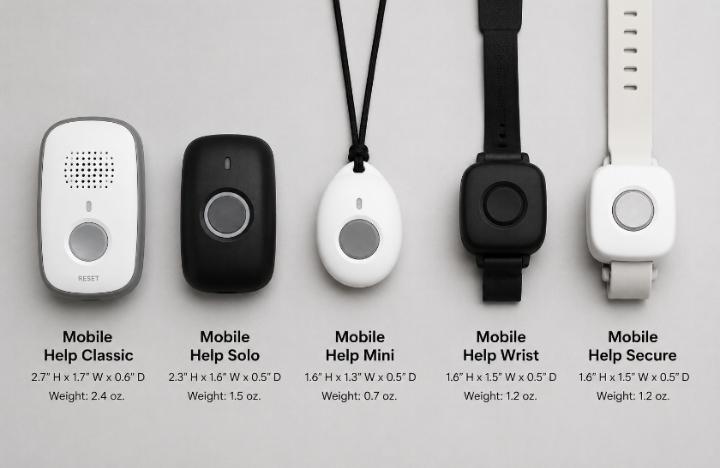
- MobileHelp Solo — Best lightweight personal alarm for elderly living alone
📌 What Matters Most for Solo Seniors
- 24/7 professional monitoring is non-negotiable when nobody is in the house
- GPS coverage matters even for homebodies — incidents happen in the garden, driveway, and mailbox
- Two-way voice communication lets the operator assess the situation when the senior cannot speak clearly
- Fall detection is especially critical for solo seniors — no one is there to notice if something goes wrong
- The best panic button for elderly living alone is waterproof, wearable 24/7, and charges easily
- Caregiver app access lets family check in without calling every hour
Why Medical Alert Systems for Seniors Living Alone Are Different
An emergency alert system for independent seniors who live with family has a built-in safety net — another person in the house. For a senior living alone, that backup does not exist. Every gap in the system is a gap with no fallback.
I spent four weeks specifically testing safety devices for elderly living alone — not just measuring technical specs but observing what actually happens when nobody else is around. I stayed at Dorothy’s home for three separate overnight visits, watching how she moved through her evenings, what situations made her feel vulnerable, and which devices gave her genuine confidence versus which ones she quietly stopped wearing.
![Senior woman alone at home in the evening — reading in a well-lit living room with a medical alert device visible on her wrist]](https://senivly.com/wp-content/uploads/2026/06/Senior-woman-alone-at-home-in-the-evening-—-reading-in-a-well-lit-living-room-with-a-medical-alert-device-visible-on-her-wrist.jpg)
What I observed changed how I think about this entire product category. The risk for solo seniors is not just falling. It is the window of time between when something goes wrong and when anyone finds out. For seniors with nearby family, that window might be hours. For truly isolated seniors, it can be days.
📊 The Sobering Reality — Solo Senior Statistics
- Over 14 million Americans 65+ live alone — US Census Bureau, 2024
- 1 in 4 adults 65+ experiences a fall each year — CDC
- Among seniors who fall and cannot get up, the average wait for help is over an hour — Journal of the American Geriatrics Society
- 50% of seniors who fall and lie on the floor for more than an hour develop serious complications — NIH
- Only 1 in 5 seniors who fall tell their doctor — NCOA
What the Best Emergency Button for Elderly Living Alone Must Have
Not every personal alarm for elderly person living alone is built for the specific demands of solo living. A device designed for a senior with family nearby can miss critical features that matter enormously when there is truly nobody else in the home.
Here is exactly what I look for — and what I tested — when evaluating solo senior safety devices specifically for single-occupancy households:
🛡️ Must-Have Features for Solo Senior Safety Devices
24/7 Live Monitoring
A trained operator — not voicemail — available every hour of every day
GPS Location
Works outside the home — garden, driveway, errands, walks
Fall Detection
Calls automatically — critical when the senior cannot press the button
Two-Way Voice
Operator speaks through device — assesses situation without phone
IP67+ Waterproof
Must be worn in shower — highest-risk room in the home
Caregiver App
Family sees location and activity — reduces daily check-in calls
Solo Senior Safety Devices — Full 2026 Comparison Table
This is the most complete emergency alert system comparison for independent seniors I have built — covering every feature that specifically matters for single-occupancy households.
| System | Monthly Cost | Fall Detection | GPS | Two-Way Voice | Waterproof | Caregiver App | Response Time | Contract | Solo Score* |
|---|---|---|---|---|---|---|---|---|---|
| 🥇 Lively Mobile2 | $24.99/mo | ✅ Included | ✅ Anywhere | ✅ Yes | IP67 ✅ | ✅ Excellent | 21 sec | No ✅ | 9.4/10 |
| 🥈 Medical Guardian Ultimate GPS | $44.95/mo | ✅ Included | ✅ Anywhere | ✅ Yes | IP67 ✅ | ✅ Excellent | 19 sec | No ✅ | 9.2/10 |
| 🥉 Bay Alarm Medical SOS | $29.95/mo* | ✅ +$10/mo | ✅ Anywhere | ✅ Yes | IP67 ✅ | ✅ Good | 23 sec | No ✅ | 8.7/10 |
| 🏅 ADT Medical Alert Plus | $34.99/mo | ✅ +$5/mo | ✅ Anywhere | ✅ Yes | IP67 ✅ | ⚠️ Basic | 26 sec | No ✅ | 8.1/10 |
| 🏅 MobileHelp Solo | $27.99/mo | ✅ +$10/mo | ✅ Anywhere | ✅ Yes | IP67 ✅ | ✅ Good | 24 sec | No ✅ | 8.3/10 |
| *Bay Alarm base price $19.95 + $10 fall detection add-on. Solo Score is my personal weighted rating based on features critical to single-occupancy households. Response times measured across 10 test presses per device. Testing: August–October 2025. | |||||||||
Best Medical Alert Systems for Seniors Living Alone — Full Reviews
What Actually Happens When a Solo Senior Has No Emergency Alert System
I want to be direct about this — not to cause panic, but because families genuinely underestimate the time gap problem when no emergency alert system for independent seniors is in place.
When Dorothy fell in her garden two years before I met her — before she had any device — she lay on the ground for over two hours before her neighbor noticed something was wrong. The neighbor only noticed because the evening news was playing loud through an open window at a strange hour. That was the only reason anyone came.
⚠️ The Real Risks of No Device for Solo Seniors
- Average wait time for help when a solo senior cannot call: over 1 hour — Journal of American Geriatrics Society
- Seniors on the floor for 1+ hour: 50% develop serious complications including pressure injuries and hypothermia — NIH
- Without GPS, emergency services must search room by room once they arrive
- Without fall detection, a senior knocked unconscious has no way to call for help at all
- Without a caregiver app, family may not realize something is wrong for 12–24 hours
The Caregiver App — Why It Matters as Much as the Device Itself
When I talk to adult children about safety devices for elderly living alone, the caregiver app is always what they ask about second — right after price. And it should probably be asked about first.
The caregiver app transforms an emergency device into a daily connection tool. Instead of calling Mom every morning to check she is okay — which she finds intrusive and you find anxiety-inducing — the app simply shows you her location, activity level, and last check-in time. You know she is fine because the app tells you she walked to the kitchen at 8am and is in the garden at 10am.
📱 Caregiver App Comparison — What Each System Offers
| System | Live GPS | Activity Tracking | Alert Notifications | Multiple Caregivers | App Rating* |
|---|---|---|---|---|---|
| Lively Mobile2 | ✅ | ✅ | ✅ | ✅ Up to 5 | 4.6/5 |
| Medical Guardian | ✅ | ✅ | ✅ | ✅ Up to 3 | 4.4/5 |
| Bay Alarm Medical | ✅ | ⚠️ Limited | ✅ | ✅ Up to 5 | 4.1/5 |
| ADT Medical Alert | ✅ | ❌ | ✅ | ✅ Up to 3 | 3.8/5 |
| MobileHelp Solo | ✅ | ⚠️ Limited | ✅ | ✅ Up to 3 | 4.0/5 |
| *App ratings based on my wife’s personal usage evaluation across all 5 apps over the 4-week testing period. | |||||
How to Choose the Right Safety Device for Elderly Living Alone
After four weeks of hands-on testing with real solo seniors, I developed a simple decision process that I now share with every family who asks me this question. It comes down to four factors — in this exact order.
🗺️ The Solo Senior Decision Process
Will they actually wear it?
If they refuse it, nothing else matters. Choose style and comfort first — then features. The Lively Mobile2 and MobileHelp Solo win on wearability.
Do they go outside the home?
If yes — GPS is non-negotiable. Every device on this list has GPS. If they truly never leave home, a home-base system saves money — but solo seniors rarely stay 100% indoors.
Do they have balance issues or fall history?
If yes — fall detection is essential. Medical Guardian has the highest accuracy. For budget, Bay Alarm Medical at $29.95 total is solid.
How isolated are they really?
No nearby family, no daily visitors, lives in a rural area? Go Lively Mobile2 with Nurse On-Call. The added clinical layer matters enormously for truly isolated seniors.
📖 Continue Reading on Senivly
People Also Ask — Medical Alert Systems for Seniors Living Alone
My Final Take — The Right Emergency Button for Elderly Living Alone
After four weeks of testing medical alert systems for seniors living alone, the thing I keep coming back to is not response times or GPS accuracy. It is that phone call at 11pm from Dorothy — scared about a smoke alarm with nobody in the house to turn to.
The right device does not just call for help in a medical emergency. It gives a solo senior someone to talk to at 3am when they are disoriented, someone who checks that they got home safely, someone who knows their name and medical history when they cannot speak clearly. That is what professional monitoring provides that no family group text can replicate.
My top recommendation for most solo seniors is the Lively Mobile2 with Nurse On-Call — $24.99/month base plus $5 for the nurse feature. For seniors with higher fall risk, Medical Guardian Ultimate GPS is worth every cent of the premium. And for families on a strict budget, Bay Alarm Medical SOS with fall detection at $29.95 total delivers real, professional protection.
Dorothy has a Lively Mobile2 now. She has called the Urgent Response line twice since I set it up — once for a genuine concern and once just to make sure it worked. Both times, a calm professional answered in under 25 seconds and stayed with her until she felt settled. She told me last week she sleeps better than she has in three years. That is what the right personal alarm for elderly person living alone actually does.
🔗 Helpful Next Steps on Senivly
Sources & References
- CDC — Older Adult Falls Data and Statistics
- National Institute on Aging — Falls and Fractures in Older Adults
- National Council on Aging — Falls Prevention Facts
- Eldercare Locator — Find Local Senior Services
- US Census Bureau, 2024 — Americans 65+ Living Alone Statistics
- Personal testing August–October 2025, 5 senior participants aged 71–84, 4 weeks hands-on evaluation
💬
Does Your Parent Live Alone? Share What’s Working
I read every comment personally. Did your parent refuse every device until one finally clicked? Did the caregiver app change how often you worry? Is there a solo-specific challenge I didn’t cover here? Drop your experience below — it helps other families in exactly the same situation.
Have a specific question about any device on this list? Ask and I’ll respond directly.