
SENIVLY BUYER’S GUIDE · UPDATED OCTOBER 2026
Best Medical Alert Watches With Fall Detection (2026)
A wearable alert device can make a big difference to how confident someone feels living on their own. Walking to the mailbox, shopping, or gardening feels easier when help is a button press away, or arrives even if you cannot press anything.
But choosing one takes more than comparing watch faces. Who answers the alert, whether the watch has its own cellular connection, how often it needs charging, and what you pay every month matter just as much.
I compared the leading options using manufacturer documentation and independent reviews, so the answer comes first and the details follow.
Quick Answer: Best Medical Alert Watches With Fall Detection in 2026
The best choice depends on who you want answering. A dedicated medical alert watch connects you to a staffed monitoring center and works without a phone. A mainstream smartwatch offers fall detection plus everyday features, but it calls emergency services or texts contacts instead.
For most readers who live alone and want a trained operator, I would start with the three dedicated watches below. If you already use an iPhone or an Android phone and have family nearby, a smartwatch may be enough.
The picks, in plain terms
Medical Guardian MGMove
A discreet dedicated watch with a caregiver portal and the longest battery of the three.
- Best for: A monitored watch with no phone, and family who want to check in.
- Automatic fall detection: Add-on (listed at $10 a month). Without it, the watch is a manual SOS button.
- Professional monitoring: Yes, 24/7, with two-way voice.
- Subscription: Required. The official page shows plans “as low as $44.95 a month.”
- Biggest limitation: Needs charging daily, and fall detection costs extra.
Bay Alarm Medical SOS Smartwatch
A simple, lower-cost dedicated watch with a short battery life.
- Best for: Budget-minded buyers who will charge nightly.
- Automatic fall detection: Optional add-on. You can cancel a false alert.
- Professional monitoring: Yes, 24/7. Operators contact your people and 911 if needed.
- Subscription: Required. From $39.95 a month, plus a one-time equipment charge.
- Biggest limitation: Battery life of 6 to 18 hours.
UnaliWear Kanega Watch
Fall detection is included, and swappable batteries allow around-the-clock wear.
- Best for: Wearers who want fall detection included and never want to remove the watch.
- Automatic fall detection: Included in the plan (UnaliWear calls it “RealFall”).
- Professional monitoring: Yes, 24/7. Alerts start by button, voice, or fall detection.
- Subscription: Required. $299 one-time, then $79.95 a month ($64.95 on the annual plan).
- Biggest limitation: Highest total cost of the three.
Apple Watch (SE 3, Series 12, or Ultra 4)
The smartwatch choice for iPhone users, with fall detection and a call to emergency services.
- Best for: iPhone owners who want a full smartwatch and have family nearby.
- Automatic fall detection: Built in; on by default for users 55 and older who entered their age.
- Professional monitoring: No. It calls emergency services and messages your contacts.
- Subscription: No monitoring fee. A cellular plan is optional (price not verified).
- Biggest limitation: Needs an iPhone, and it does not detect every fall.
Samsung Galaxy Watch 9
The Android option, which texts your contacts if you do not respond after a fall.
- Best for: Android users who want a full smartwatch.
- Automatic fall detection: Built in but off by default. After 60 seconds without a response, it sends an SOS to your contacts.
- Professional monitoring: No. It messages your emergency contacts.
- Subscription: No monitoring fee. $379.99 Bluetooth, $429.99 LTE; a cellular plan is extra.
- Biggest limitation: Needs a paired phone, and fall detection must be turned on.
Before you buy
Product features, availability, and prices can change. Confirm the current specifications and service requirements with the manufacturer before purchasing. Automatic fall detection is not guaranteed to detect every fall.
Want to compare pendants and home systems as well? My guide to the best medical alert systems for seniors in 2026 covers the full range.
Quick Comparison Table
Scroll sideways on a phone. Prices come from manufacturer pages unless noted, and any detail marked as unconfirmed needs checking before you buy. You can also use my medical alert comparison tool to line up systems side by side.
| Product | Type | Auto fall detection | Professional monitoring | Phone or cellular | GPS or location | Monthly service | Best for | Main limitation |
|---|---|---|---|---|---|---|---|---|
| MGMove | Dedicated watch | Add-on | Yes, 24/7 | Built-in 4G LTE, no smartphone | Yes, GPS location on SOS; caregiver portal | From $44.95 (“as low as”); fall detection +$10 | Monitored help plus family check-ins | Daily charging; extra cost for fall detection |
| Bay Alarm SOS Smartwatch | Dedicated watch | Optional add-on | Yes, 24/7 | Built-in 4G LTE, no smartphone | Yes, GPS; app tracking described by Bay Alarm | From $39.95; fall detection extra | Lower upfront cost | 6 to 18 hour battery |
| UnaliWear Kanega | Dedicated watch | Included | Yes, 24/7 | Wi-Fi plus Verizon LTE, no smartphone | Yes, GPS location tracking | $79.95 monthly or $64.95 annual plan | Fall detection included, 24/7 wear | Highest total cost; wide band |
| Apple Watch | Smartwatch | Built in | No. Calls emergency services and messages contacts | Needs iPhone; cellular or Wi-Fi calling for calls | Shares location with emergency services and contacts | None for monitoring; cellular plan optional | iPhone owners who want a full smartwatch | No monitoring center; not every fall detected |
| Samsung Galaxy Watch 9 | Smartwatch | Built in, off by default | No. Messages emergency contacts | Needs paired smartphone for SOS | Location shared with contacts | None for monitoring; cellular plan optional | Android owners | Needs phone; no monitoring center |
A note on “free”
A smartwatch has no monitoring subscription, but that is not the same as a free medical alert service. You still pay for the watch and a compatible phone, possibly a cellular plan, and you get no monitoring center.
How I Chose These Medical Alert Watches
I did not buy, wear, or lab-test any of these devices. This guide is based on manufacturer product, pricing, and support pages, plus independent reviews and tests published by outlets such as AARP and NCOA, all checked in October 2026.
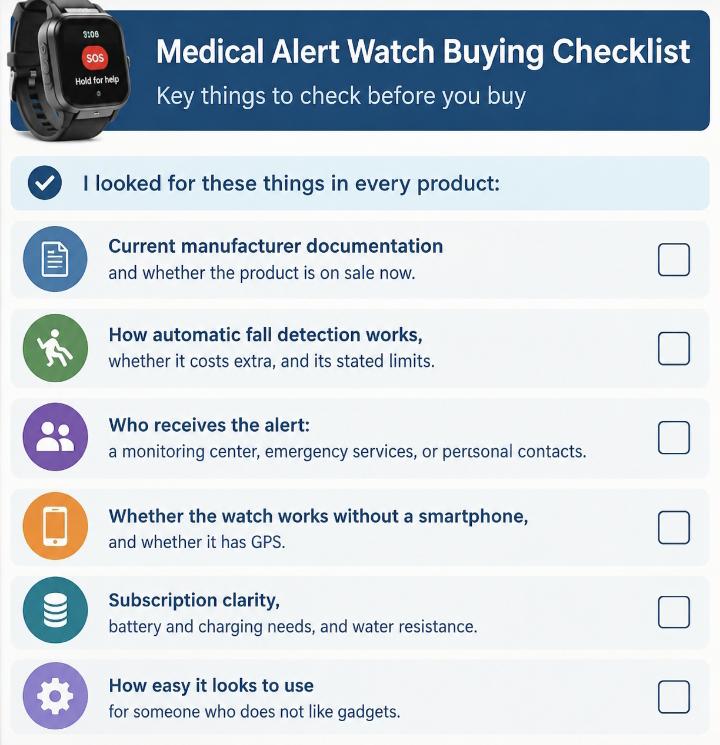
I looked for these things in every product:
- Current manufacturer documentation and whether the product is on sale now.
- How automatic fall detection works, whether it costs extra, and its stated limits.
- Who receives the alert: a monitoring center, emergency services, or personal contacts.
- Whether the watch works without a smartphone, and whether it has GPS.
- Subscription clarity, battery and charging needs, and water resistance.
- How easy it looks to use for someone who does not like gadgets.
I chose products that differ in real ways, not five copies of the same watch. Where manufacturers and reviewers disagreed, I went with the manufacturer’s current page and say so. Some earlier reviews, for example, still say the MGMove has no fall detection, while Medical Guardian now lists it as an add-on.
Details I could not confirm are marked as such. Nothing here is a clinical test result or a ranking by score.
Detailed Reviews of the Best Medical Alert Watches With Fall Detection
1. Medical Guardian MGMove
Overview
The MGMove is a dedicated medical alert watch from Medical Guardian, not a general smartwatch. It has a 1.25 inch face, weighs 2 ounces, and looks like an ordinary watch.
Fall detection and emergency response
Medical Guardian describes its fall detection add-on as an option that can tell soft falls from hard impacts. When it detects a fall, it opens a voice connection and, if needed, calls for help.
The watch connects over built-in 4G LTE, so it does not need a smartphone. The manufacturer does not spell out the full detection sequence or whether a fall alert can be canceled. That is not clearly specified on the product page. A cancel button is documented for accidental SOS presses.
Important features
- Two-way voice with a 24/7 U.S. monitoring center, through the watch.
- GPS location on SOS, with hourly location history in the family portal.
- Step counting and weather. Messages and Reminders apps cost extra.
- Up to 24 hours of battery, with a 1 to 2 hour charge time.
Cost and subscription
The product page shows plans “as low as $44.95 a month.” Medical Guardian’s blog lists fall detection as a $10 monthly add-on. Independent reviewers report a $199.95 one-time equipment fee, but the product page I reviewed does not show it, so confirm at checkout.
Plan price depends on billing length and promotions.
Advantages
- No smartphone needed for the basic plan.
- Caregiver portal shows location and step data.
- Longest listed battery of the dedicated watches here.
Limitations
- Fall detection is an extra monthly charge.
- Needs charging every day.
- The band cannot be swapped, per the manufacturer.
Who should consider it?
Someone who wants a monitored watch that looks like a normal one, and a family member who wants to check in.
Who may want another option?
Someone who wants fall detection included in the base price, or who cannot manage daily charging.
Verdict
A well-rounded monitored watch with caregiver tools. The trade-off is paying extra for fall detection and charging daily. Official MGMove page.
2. Bay Alarm Medical SOS Smartwatch
Overview
The SOS Smartwatch is a standalone medical alert watch from Bay Alarm Medical. It has a 1.25 inch screen, weighs 2 ounces, and a bright red physical SOS button on the side.
Fall detection and emergency response
You hold the button for 5 seconds. A monitoring operator speaks through the watch, tracks your location, and contacts friends, family, neighbors, or local 911 services as needed.
Automatic fall detection is an optional add-on that Bay Alarm says uses AI. When it detects a fall, the watch asks, “Fall Detected. Did you fall?” You can cancel an accidental alert.
Important features
- Built-in 4G LTE included in the plan, no smartphone required.
- GPS location sent to the monitoring center. The FAQ says tracking is monitoring-center only, while another section describes caregiver tracking in the app, so ask which applies.
- Battery of 6 to 18 hours, with a 2 to 3 hour charge.
- IP67 water resistance. Step counter and weather.
Cost and subscription
Service starts at $39.95 a month. Bay Alarm’s own comparison page lists a $159 equipment purchase and $10 a month for fall detection, which puts the watch with fall detection at $49.95 a month.
Sales and bundles change often, so check the pricing page.
Advantages
- Lower equipment cost than the MGMove or UnaliWear.
- Dedicated SOS button that does not need the screen.
- Straightforward interface without extra apps.
Limitations
- Short battery life means nightly charging, and some days may need two.
- Fall detection costs extra.
- Caregiver tracking details are inconsistent on the manufacturer’s site.
Who should consider it?
Budget-conscious buyers who will charge the watch every night and want a simple device.
Who may want another option?
People who forget to charge, or who want fall detection included in the base price.
Verdict
A simple, lower-cost monitored watch. The main trade-off is battery life. Official SOS Smartwatch page.
3. UnaliWear Kanega Watch
Overview
The Kanega Watch is a dedicated watch from UnaliWear with a thicker band that holds swappable batteries. It can be activated by button, by voice, or by fall detection.
Fall detection and emergency response
Alerts go to a U.S.-based monitoring center. The agent speaks to the wearer through the watch. If the wearer does not respond, the agent calls the wearer’s phone number, then the first emergency contact, then dispatches emergency services.
Fall detection is included in the plan. UnaliWear markets it as “RealFall,” which it says learns each wearer’s movements. That is a manufacturer claim. The product page does not say whether a fall alert can be canceled.
Important features
- Wi-Fi at home and Verizon LTE away from home, with no smartphone needed.
- GPS location tracking and medication reminders.
- Two batteries last 24 to 36 hours. A spare pair swaps in seconds, so the watch can stay on.
- IP67. Fine for the shower, but not for baths or swimming.
Cost and subscription
There is a one-time $299 charge for the watch, batteries, charger, and setup. The monthly plan is $79.95 a month, and the annual plan is $64.95 a month paid up front.
First-year cost is $1,258.40 on the monthly plan or $1,078.40 on the annual plan. UnaliWear offers a 30-day money-back guarantee, less a $75 restocking fee.
Advantages
- Fall detection included in the plan.
- Can be worn day and night without removing it to charge.
- Voice activation helps if pressing a button is hard.
Limitations
- Highest total cost of the watches here.
- The band is wider than most watches.
- Battery swaps become a daily habit.
Who should consider it?
Someone who wants fall detection included, round-the-clock wear, and voice activation.
Who may want another option?
Budget-focused buyers, or anyone who dislikes a thicker band.
Verdict
A feature-rich watch built around constant wear. The trade-off is price. Official Kanega Watch page.
4. Apple Watch (SE 3, Series 12, Ultra 4)
Overview
Apple Watch is a general-purpose smartwatch, not a medical alert service. Apple’s current lineup is the SE 3 from $249, the Series 12 from $399, and the Ultra 4 from $799, according to recent coverage of Apple’s pricing.
Fall detection and emergency response
According to Apple, if the watch detects a hard fall and you stay immobile for about a minute, it taps your wrist, sounds an alarm, and then attempts to call emergency services. It also messages your emergency contacts.
To place the call, the watch or a nearby iPhone needs a cellular connection, or Wi-Fi calling with coverage. Apple says the watch cannot detect all falls.
Important features
- Fall detection is built into the SE and Series 4 and later.
- It turns on automatically for users 55 and older who entered their age.
- Location is shared with emergency services and contacts after a fall.
- Medical ID can be shared with emergency services if turned on.
Cost and subscription
There is no monitoring subscription. You pay for the watch and an iPhone. A cellular model and a carrier plan may be needed for calls without the phone nearby, and I did not verify those prices.
Advantages
- Fall detection comes with the watch.
- Calls emergency services directly.
- Useful everyday features.
Limitations
- No monitoring center or operator.
- Requires an iPhone.
- Easy to turn off or forget to charge.
Who should consider it?
iPhone owners who already enjoy a smartwatch and have family nearby.
Who may want another option?
Anyone without an iPhone, anyone who wants a human operator, or someone who finds screens confusing.
Verdict
A capable smartwatch with a real safety feature. The trade-off is that it is a consumer device, not a monitored service. Apple’s fall detection page.
5. Samsung Galaxy Watch 9
Overview
The Galaxy Watch 9 is Samsung’s current mainstream smartwatch. It is priced at $379.99 for Bluetooth models and $429.99 for LTE, according to recent coverage of Samsung’s launch.
Fall detection and emergency response
Samsung says fall detection is not turned on by default and must be enabled in the Galaxy Wearable app. After a hard fall, the watch alerts you for 60 seconds. If you do not respond, it sends SOS messages to your emergency contacts.
Samsung notes that sending SOS calls and messages requires a network connection and smartphone pairing, and that the watch cannot detect all falls.
Important features
- Works with Samsung and other Android phones.
- Messages emergency contacts with your location.
- Large screen and many health features.
- Battery life is reported around 30 hours with the always-on display, from a third-party source, so confirm.
Cost and subscription
No monitoring subscription. You pay for the watch, an Android phone, and possibly a cellular plan for LTE use. I did not verify carrier plan prices.
Advantages
- Fall detection included.
- Contacts get your location.
- Works with many Android phones.
Limitations
- Must be turned on manually.
- Needs a paired phone to send SOS messages.
- No monitoring center, and Samsung’s documentation does not say it calls emergency services after a fall.
Who should consider it?
Android users who like smartwatches and want family contacts alerted after a fall.
Who may want another option?
Anyone who wants a live operator, does not use a smartphone, or has no nearby contacts.
Verdict
A good Android smartwatch with a safety feature. The trade-off is that it texts people instead of reaching a monitoring center. Samsung’s fall detection support page.
Medical Alert Watch vs. Smartwatch With Fall Detection
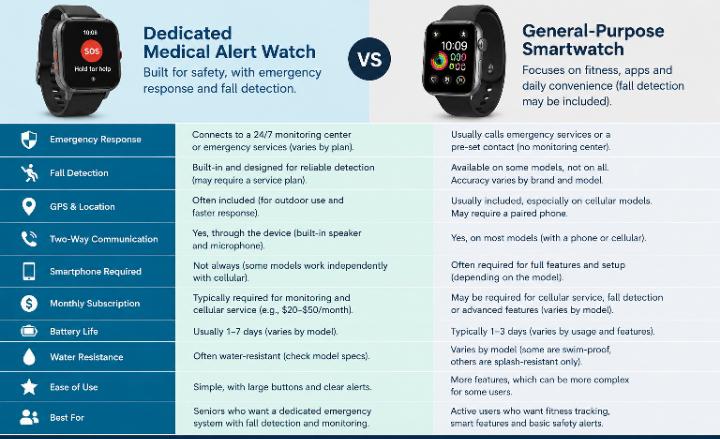
These two categories solve different problems. A dedicated medical alert watch is built around reaching a person who can help. A smartwatch is built around everyday life, with fall detection added.
| Feature | Dedicated medical alert watch | Smartwatch with fall detection |
|---|---|---|
| Who responds | A staffed 24/7 monitoring center | Emergency services or your personal contacts, depending on brand |
| Automatic fall detection | Add-on or included, depending on the product | Built in, but varies by brand and settings |
| Emergency SOS | Yes, a dedicated button | Yes, but menus and settings vary |
| Contacting family | Operator can call them | Texts or messages after a fall (Samsung, Apple) |
| Phone needed | No, cellular built in | Usually yes, unless it is a cellular model |
| GPS | Yes | Yes |
| Subscription | Required monthly | None for monitoring; cellular plan optional |
| Battery | 6 to 36 hours among watches here | Varies; often daily charging |
| Ease of use | Few features, simple | Many features, more to learn |
A smartwatch can be a good safety tool, but it may not offer the same monitored arrangement as a dedicated service. Google’s Pixel Watch also offers fall detection, so check Google’s own documentation if you are considering it.
A simple decision rule
A dedicated medical alert service may be more suitable for someone who wants a monitored emergency response arrangement. A compatible smartwatch may suit someone who also values everyday smartwatch functions and understands its connectivity and emergency-response limitations.
Not sure a watch is right at all? My comparison of a medical alert watch versus a pendant covers who tends to prefer each.
What to Look for When Buying a Medical Alert Watch
Automatic fall detection
It senses a possible fall from wrist movement and sends an alert if you do not respond. It can miss some falls and trigger false alarms, so treat it as a backup to the help button, not a replacement. Many dedicated watches charge extra for it.
Monitoring center or personal contacts
A monitoring center operator talks to you through the watch and decides what to do. A smartwatch usually calls emergency services or texts a contact. Ask who receives the alert and what happens next.
GPS and cellular connectivity
A watch with built-in cellular, like the three dedicated watches here, works without a phone. A smartwatch usually relies on a paired phone unless you buy a cellular model and a plan. If you walk or shop alone, this matters.
Monthly fees and hidden costs
Look at the monthly plan, fall detection add-on, equipment fee, activation or setup charge, cancellation terms, and any cellular plan. A low upfront price can still be the costlier choice.
Battery and charging
Pick a watch you will actually charge. A short battery is fine if charging is part of a nightly routine. UnaliWear’s swappable batteries suit people who do not want to remove the watch.
Comfort and ease of use
Check weight, band comfort, screen readability, and whether the SOS button is easy to find by feel. A watch that sits in a drawer protects no one.
Water resistance
IP67 handles splashes and brief exposure. Manufacturers here say showering is fine but baths and swimming are not. Do not assume shower safety unless the documentation supports it.
Two-way voice and phone compatibility
Dedicated watches let you talk to an operator through the watch. For smartwatches, confirm compatibility with your phone before buying, since Apple Watch needs an iPhone and Samsung needs an Android phone.
Coverage, caregiver access, and returns
Cellular coverage and service areas vary, so ask about coverage at your home. Check what family members can see, such as location and battery level, and what privacy controls exist. Read the return window, warranty, and cancellation terms before you pay.
How Much Does a Medical Alert Watch With Fall Detection Cost?
Costs fall into a few buckets: the device, monthly monitoring, any fall detection fee, cellular service, setup fees, and replacement costs. Here is a first-year estimate using the figures I could verify.
First-year cost = device price + 12 months of service + required one-time fees.
| Product | Calculation | First-year total |
|---|---|---|
| MGMove with fall detection | $199.95 device + 12 × ($44.95 + $10) = $199.95 + $659.40 | $859.35 (device price from independent reviewers; plan price is “as low as”) |
| Bay Alarm SOS Smartwatch with fall detection | $159 equipment + 12 × $49.95 = $159 + $599.40 | $758.40 |
| UnaliWear Kanega, monthly plan | $299 + 12 × $79.95 = $299 + $959.40 | $1,258.40 |
| UnaliWear Kanega, annual plan | $299 + 12 × $64.95 = $299 + $779.40 | $1,078.40 (matches UnaliWear’s stated figure) |
| Apple Watch SE 3 | $249 watch; monitoring $0 | $249 plus an iPhone and any cellular plan (not verified) |
| Samsung Galaxy Watch 9 (Bluetooth) | $379.99 watch; monitoring $0 | $379.99 plus an Android phone and any cellular plan (not verified) |
Notice that the cheapest watch up front is not the cheapest dedicated option over a year, and the dedicated watches include things a smartwatch does not, like a monitoring center and cellular service. Prices may change with promotions, so confirm them on the manufacturer’s pricing page.
What about a medical alert watch with no monthly fee?
People search for this, so here is the honest version. A smartwatch with no monitoring fee can place an emergency call or text contacts after a fall. It does not include a monitoring center, and you may still pay for a phone and a cellular plan.
I have not verified any no-fee watch from a lesser-known brand, so I do not recommend one. If you are considering one, read the support page carefully and check who actually receives the alert.
Are Medical Alert Watches With Fall Detection Reliable?
They can help, but none is perfect. Apple and Samsung both say their watches cannot detect all falls, and active users may get false alerts. Reviewers also report that soft or slow falls are harder to detect than hard ones.
- Missed falls: some falls may not trigger the feature.
- False alarms: clapping, dropping the watch, or vigorous exercise can look like a fall.
- No response: a person who cannot respond may rely on the system to escalate, which depends on how it is set up.
- Battery and coverage: a dead battery, weak cellular signal, or limited GPS can delay or block an alert.
- Detection is not diagnosis: a possible fall alert does not confirm that someone is hurt.
I am not quoting accuracy percentages, because I could not verify a reliable figure for the current versions of these products. Independent testers such as AARP and NCOA run their own fall tests, and results differ by product and method.
Read the manufacturer’s documentation, and test the alert process the way each company instructs. For a broader look at systems with fall detection, see my guide to medical alert systems with fall detection.
Falls also tend to happen at predictable times and places. My tips for preventing nighttime falls between the bedroom and bathroom are a good companion to any device. The CDC and NIA both offer fall-prevention resources, and a clinician can help with ongoing concerns. CDC falls page, NIA falls guidance.
If you keep falling
A device is a safety net, not a plan. If falls are frequent, talk to a doctor or physical therapist about balance, medications, and vision.
Which Medical Alert Watch Is Best for Different Users?
An older adult who lives alone
Prioritize a monitoring center and a watch that works without a phone. The MGMove, Bay Alarm SOS Smartwatch, or Kanega fit. The trade-off is a monthly fee. A pendant may suit someone who will not wear a watch. See my notes on medical alert systems for seniors who live alone.
A senior who frequently walks outside
Look for cellular and GPS. All three dedicated watches qualify. A smartwatch works if the phone comes along or the watch has LTE. The trade-off is battery life, which is shortest on the Bay Alarm watch.
Someone without a smartphone
Choose a dedicated watch. The MGMove, Bay Alarm, and Kanega all work without a phone. Apple Watch and Samsung require one.
Someone who wants professional monitoring
Any of the three dedicated watches. Among them, the Kanega includes fall detection in the plan, while the others charge extra. A pendant or home system may suit if watches are uncomfortable.
A caregiver who wants location sharing
The MGMove offers a caregiver portal with location history and step data, according to Medical Guardian. Bay Alarm describes an app with location and battery status, though its FAQ is inconsistent. Smartwatches share location with contacts after a fall.
Someone who wants smartwatch features too
An Apple Watch for iPhone owners or a Galaxy Watch for Android owners. The trade-off is that no operator answers, and the person must manage a phone and charging.
A buyer worried about monthly cost
A smartwatch has no monitoring fee, but you still pay for the watch, a phone, and perhaps a cellular plan. Among dedicated watches, the Bay Alarm watch has the lowest starting monthly price. A medical alert pendant may cost less overall.
Someone who struggles with charging or small screens
The Kanega’s swappable batteries and voice activation address both. The MGMove has a physical SOS button and a simple interface. Avoid smartwatches here, since they have more to learn and charge.
Frequently Asked Questions
What is the best medical alert watch with fall detection in 2026?
It depends on who you want answering. For a monitored arrangement, the MGMove, Bay Alarm SOS Smartwatch, and UnaliWear Kanega are the dedicated options I reviewed. For smartwatch features, an Apple Watch or Galaxy Watch works. Compare their costs and limits first.
Do medical alert watches automatically call 911 after a fall?
Not usually. Dedicated watches contact a monitoring center, which then contacts you, your emergency contacts, or dispatches help. Apple Watch can call emergency services directly. Samsung’s documentation says it sends SOS messages to your contacts.
Do medical alert watches require a monthly subscription?
Dedicated watches do. Apple Watch and Galaxy Watch have no monitoring fee, but you may need a cellular plan and a phone.
Can a medical alert watch work without a smartphone?
Yes, the three dedicated watches here have built-in cellular and need no smartphone. Apple Watch needs an iPhone for setup, and Samsung says SOS messages require smartphone pairing.
Are medical alert watches better than medical alert pendants?
Neither is always better. Watches are easy to wear and look ordinary, but battery life is shorter. Pendants can last longer on a charge. The best device is the one the person will actually wear. See my watch versus pendant guide.
Do Apple Watch models offer fall detection?
Yes, on the SE and Series 4 and later, according to Apple. It turns on automatically for users 55 and older who entered their age. Apple notes the watch cannot detect all falls.
Can a smartwatch replace a dedicated medical alert system?
It can for some people, especially those comfortable with phones who have family nearby. It does not provide a monitoring center, so someone who wants an operator should consider a dedicated service.
Does fall detection work if the wearer loses consciousness?
That is the situation fall detection is meant for, but no product guarantees it. Detection may miss some falls, and an alert depends on battery, coverage, and settings. Treat it as a backup.
Can medical alert watches be worn in the shower?
The MGMove, Bay Alarm, and Kanega are all rated IP67, and their makers say showering is fine. Do not submerge them in baths or pools. Check the rating for any smartwatch before showering.
What is the best medical alert watch for seniors who live alone?
A dedicated watch with a monitoring center and built-in cellular, such as the MGMove, Bay Alarm, or Kanega, is a sensible starting point. Choose by budget, battery routine, and whether fall detection is included.
Are there medical alert watches with GPS?
Yes. The MGMove, Bay Alarm SOS Smartwatch, and Kanega all include GPS. Smartwatches also use GPS and can share location with contacts after a fall.
What should caregivers check before buying a fall detection watch?
Check who receives alerts, phone requirements, fall detection cost, charging, water resistance, home coverage, return policy, and what family can see.
Final Verdict
If you want a monitored arrangement without a phone, a dedicated watch is the safer starting point. The MGMove suits people who want a caregiver portal and a longer battery. The Bay Alarm watch costs less. The Kanega includes fall detection and can stay on your wrist around the clock.
If you already enjoy a smartwatch and have family close by, an Apple Watch or Galaxy Watch can add a useful safety layer, as long as you accept that no operator answers.
Your own routine matters most: mobility, phone use, budget, and whether you will charge the watch. Confirm current prices, coverage, and terms before you buy, and remember that no watch detects every fall. For a wider look, see my review of the best medical alert systems for seniors.
Sources and Further Reading
- Medical Guardian. MGMove product page. https://www.medicalguardian.com/medical-alert-systems/smart-watch-alert-app/
MGMove specifications, 4G LTE, no smartphone requirement, IP67, battery, and “as low as $44.95 a month” pricing. - Medical Guardian. Smart Watches for Seniors with Fall Detection: What Actually Works in 2026 (Oct. 2, 2026). https://www.medicalguardian.com/medical-alert-blog/health-wellness/smart-watch-for-seniors-with-fall-detection
MGMove fall detection add-on at $10 a month and manufacturer claims about monitoring and cellular carriers. A manufacturer blog. - SafeHome. Medical Guardian cost and packages (updated Oct. 1, 2026). https://www.safehome.org/medical-alert-systems/medical-guardian/
Independent report of the $199.95 MGMove equipment fee. - Bay Alarm Medical. SOS Smartwatch. https://www.bayalarmmedical.com/medical-alert-system/sos-smartwatch/
SOS Smartwatch features, 4G LTE, fall detection add-on, cancellation, battery, IP67, and prices from $39.95. - Bay Alarm Medical. SOS Mobile vs. SOS Smartwatch comparison page (page title shown as “Up to 40% Off – Ends Soon”). https://www.bayalarmmedical.com/?p=38414
$159 equipment purchase and $10 a month fall detection add-on. - UnaliWear. The Kanega Watch: Medical Alert Watch with Fall Detection. https://www.unaliwear.com/product/kanega-watch/
$299 one-time charge, $79.95 monthly and $64.95 annual plans, included fall detection, batteries, Wi-Fi and Verizon LTE, IP67, and the monitoring process. - Apple. Manage fall detection on Apple Watch (Apple Watch User Guide). https://support.apple.com/en-is/guide/watch/apd34c409704/watchos
How fall detection works, the one-minute immobility rule, emergency calling requirements, and the age 55 default. - Samsung. Use the Detect fall feature on your Samsung smart watch. https://www.samsung.com/us/support/answer/ANS00087244/
Fall detection setup, 60-second alert, SOS messages to contacts, and smartphone pairing requirement. - Digital Trends. Galaxy Watch 9 launch and pricing. https://digitaltrends.com/wearables/galaxy-watch-9-brings-a-new-chip-bigger-batteries-one-ui-9-watch-and-a-hefty-asking-price
Galaxy Watch 9 launch prices ($379.99 and $429.99). A secondary source. - Macworld. Best Apple Watch 2026: Series 12 vs Ultra 4 vs SE 3. https://www.macworld.com/article/671574/best-apple-watch.html
Current Apple Watch lineup and starting prices. A secondary source. - AARP. The Best Medical Alert Watches of 2026. https://www.aarp.org/caregiving/home-care/best-medical-alert-watches.html
Example of independent testing with older adult testers. - NCOA. The Best Medical Alert Watches of 2026. https://www.ncoa.org/product-resources/medical-alert-systems/best-medical-alert-watches/
Independent review context for MGMove and other watches. - CDC. Older Adult Fall Prevention. https://www.cdc.gov/falls/
Fall-prevention information for older adults. - CDC. STEADI: Older Adult Fall Prevention. https://www.cdc.gov/steadi/
Fall-risk resources for older adults and families. - National Institute on Aging. Falls and Falls Prevention. https://www.nia.nih.gov/health/falls-and-falls-prevention
Plain-language fall-prevention guidance.
This article is general information, not medical, legal, or financial advice. Features, prices, and availability change, so confirm details with each manufacturer. Senivly did not purchase or test these devices.